What is MUX
MUX (MCP Multiplexer) is a central asset and configuration manager for AI coding Agents. It keeps MCPs, reusable Model Profiles, and user-level Skills in central libraries, then lets Claude Code, Codex, Cursor, QoderWork, OpenCode, and other Agents consume them.
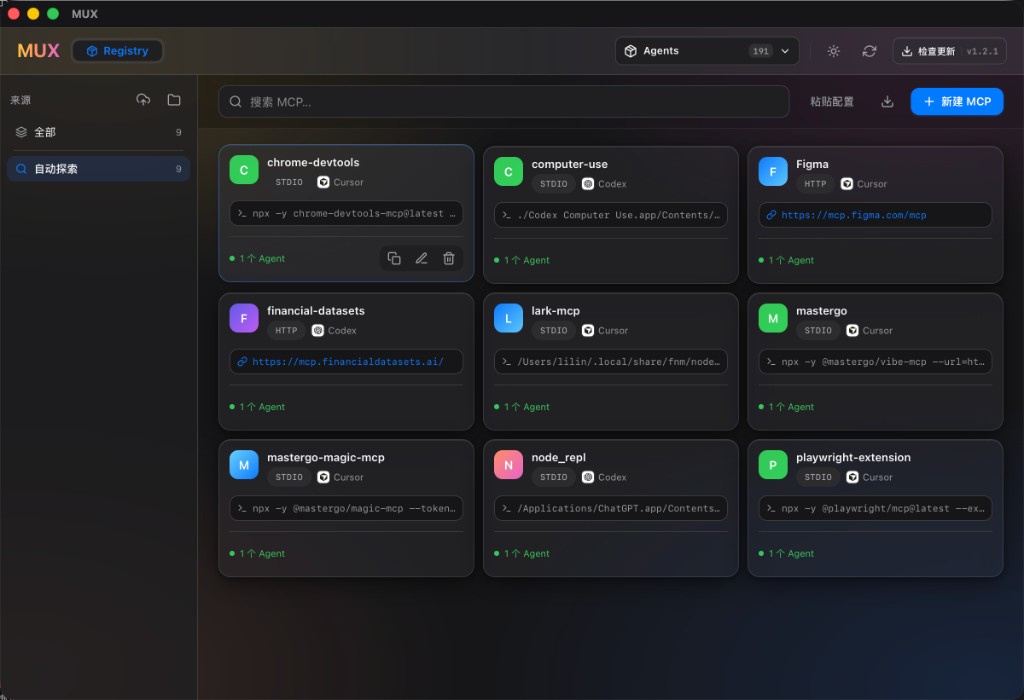
For a breakdown of each area above, see the desktop app walkthrough.
What problem it solves
If you use several AI coding tools at once (Claude Code, Cursor, VS Code, Codex, Zed, …), each one keeps its own MCP config file, with a different format, path, and set of fields. To give them all the same MCP (say filesystem, github, or context7), you have to:
- find each tool's config file path;
- write it out in that tool's own format (JSON / TOML / YAML), with its own key names and map/list layout;
- and edit them all again just to change one server's parameters.
MUX collects MCP servers into one catalog (the Registry) and applies the same product logic to Models and Skills: configure centrally → choose consumers → review impact → transact and verify. MCPs and Skills are 0..N per Agent. A native multi-model Agent may also have several assigned Model Profiles but at most one current Profile; a single-model Agent remains limited to one.
Two front-ends, one set of data
MUX has two interfaces, and they share the same data directory, ~/.mux/:
| Description | |
|---|---|
| Desktop app | A macOS application (Tauri + React). Visual management, best for the mouse. |
| CLI / TUI | The native Rust binary mux. Its subcommands manage consumption across all three asset domains; with no arguments it opens the MCP-focused terminal workspace. |
Because both are built on the same Rust core crate (mux-core), the data model exists in only one place. A change you make in the desktop app shows up in the CLI after a refresh, and vice versa.
The core idea: central assets and consumption
MUX does not ship a hardcoded MCP list. Your catalog is assembled from sources:
- Subscribe to a remote URL (pointing at an MCP config file); MUX fetches and caches it;
- Import a local config file;
- Manually add / paste a server;
- Treat MCPs found only in Agent files as read-only external state; they enter the central catalog only through an explicit import.
The catalog is the union of all enabled managed sources. A separate desired relationship records which Agent should consume which asset; scanning never infers ownership. See Core concepts for details.
What it can do (feature overview)
- Browse the catalog: search, filter by source, and see each MCP's transport, source, which agents use it, and its GitHub repo.
- Manage consumers: edit desired relationships only from the relevant Agent page, then review and write with backups; asset Inspectors show impact read-only.
- Reconcile state: distinguish synced, externally added, changed, removed, unparseable, ambiguous, and unsupported observations without silent background overwrite.
- Cascade lifecycle changes: central updates propagate to every consumer; central deletion also clears relationships and managed Agent targets.
- Edit / paste: edit an MCP config visually, or paste an
mcpServersJSON/TOML block for automatic recognition. - Recover transactions: central changes, relationships, and every target commit together; after a crash, startup verifies completion or restores durable snapshots.
- Export the effective catalog: export the deduplicated, complete catalog as standard MCP JSON.
- Source management: subscribe, import, refresh, enable/disable, and delete sources.
- Agent management: add a custom agent and edit its config file path.
- Auto-update: both the desktop app and the standalone CLI follow the latest stable channel.
Next → Installation